Raise Phone To Answer Call: Auto Call Answer App for Android
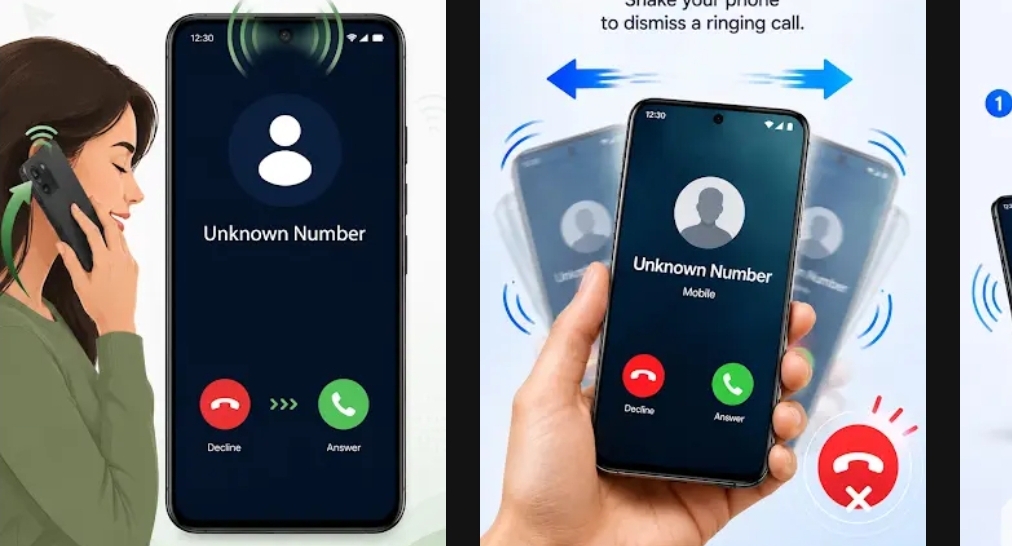
Answering phone calls can sometimes be inconvenient, especially when your hands are busy, you are driving, cooking, working, or simply do not want to touch the phone screen. The Raise Phone To Answer Call app is designed to make answering incoming calls easier by using the motion of your phone. Instead of searching for the answer button every time a call arrives, you can use a simple raise-and-answer gesture to interact with incoming calls.
According to the Google Play Store information shown for the app, Raise Phone To Answer Call is developed by Ronraj Tech. The application contains ads and offers in-app purchases. Its recent update introduces improved motion-based call controls, making the app more useful for people who prefer gesture-based interaction with their smartphone.
What Is Raise Phone To Answer Call?
Raise Phone To Answer Call is an Android application focused on simplifying the process of answering incoming phone calls. The basic idea is simple: instead of manually tapping the answer button, the app can detect a particular movement or position of the smartphone and use that motion as a call-control gesture.
This type of feature can be useful for users who frequently receive calls while their hands are occupied. For example, imagine that your phone is lying on a table and someone calls you while you are doing household work. With a motion-based answering feature, interacting with the phone can become faster and more convenient.
The app is particularly interesting because it focuses on a natural smartphone action. People commonly pick up their phones when a call arrives. Turning that natural movement into a call-answering action can reduce the number of taps required to answer a call.
How Does the App Work?
The application relies on motion-based controls. Modern Android smartphones generally include sensors such as an accelerometer and gyroscope that can detect movement, rotation, and changes in the phone’s position. Apps can use these sensors to recognize specific gestures.
When an incoming call is received, the application can monitor the phone’s movement according to the permissions and settings enabled by the user. When the required motion is detected, the app can trigger the configured call action.
The exact behavior can depend on the device, Android version, manufacturer restrictions, and the permissions granted to the application. Some smartphones also apply background activity restrictions to apps, so users may need to allow the required permissions for the feature to work correctly.
Key Features of Raise Phone To Answer Call
1. Motion-Based Call Controls
One of the main features highlighted in the Play Store listing is smarter motion-based call control. This allows users to interact with incoming calls using movement instead of relying entirely on touchscreen controls.
2. Raise-to-Answer Concept
The main attraction of the application is its raise-to-answer concept. When the phone is raised or moved in the configured way, the application can recognize the action and respond according to its call settings. This can make answering calls feel more natural.
3. Hands-Free Convenience
A gesture-based call feature can be convenient when touching the screen is difficult. Whether you are working, carrying something, or simply want a faster way to answer, motion controls can reduce the need for manual interaction.
4. Simple Call Interaction
The purpose of the application is focused and straightforward. Instead of providing a large collection of unrelated functions, it concentrates on making incoming call handling easier through phone movement.
5. Improved Motion Detection
The app’s latest update, shown in the provided Google Play Store screenshot, mentions improved motion-based call controls. Better motion detection can help the application recognize gestures more effectively while reducing accidental actions.
Why Use a Motion-Based Call Answering App?
Traditional call answering requires the user to look at the display and interact with the answer control. While this is normally simple, there are situations where it is not convenient. Motion-based controls provide another way to interact with an incoming call.
For people who receive many calls throughout the day, small improvements in everyday phone interaction can make a noticeable difference. A quick gesture may be easier than repeatedly locating and pressing an on-screen button.
The feature may also appeal to users who enjoy customizing their Android experience. Android offers many possibilities for gesture controls, and applications such as Raise Phone To Answer Call can add additional functionality to a standard smartphone.
Useful Situations for Raise Phone To Answer Call
There are several situations where this type of application may be useful. Someone cooking in the kitchen may not want to touch the phone with wet or dirty hands. A person working at a desk may want to answer a call quickly without navigating through the screen. Similarly, users carrying objects may find a gesture-based interaction more convenient.
The app can also be useful for people who prefer simple phone controls. Instead of remembering complicated shortcuts, the basic idea of raising the phone is easy to understand and can feel more natural than navigating through multiple settings.
Latest Update and Improvements
The Google Play Store screenshot shows that the app was last updated on August 12, 2026. The update information highlights a “New & Improved” experience and specifically mentions smarter motion-based call controls.
Updates are important for applications that depend on device sensors because Android phones vary considerably in hardware and software. Improvements to motion detection can help developers provide more reliable behavior across supported devices.
Users should always keep the application updated when a new version is available. Updates may include performance improvements, compatibility changes, bug fixes, and refinements to existing features.
How to Get Started
Getting started with a motion-based call answering application is generally straightforward. First, install the app on a compatible Android smartphone. After opening it, review the available settings and enable the features you want to use.
Depending on your Android device, the application may request permissions related to phone calls, notifications, accessibility, or background operation. Read each permission request carefully and only grant permissions that are necessary for the feature you want to use.
After configuration, test the feature with a call. Testing is important because sensor sensitivity and background restrictions can vary between different smartphones. If the gesture does not work correctly, check the app’s settings and your phone’s battery optimization or background activity settings.
Things to Keep in Mind
Although motion-based call answering can be convenient, it may not work identically on every Android device. Smartphone manufacturers often add their own battery-saving systems, security features, and background restrictions. These can affect applications that need to detect events while running in the background.
Another important factor is accidental movement. If the application is configured too sensitively, certain phone movements could potentially be interpreted as a gesture. Users should configure the feature carefully and test it before relying on it for important calls.
The Play Store listing also indicates that the application contains advertisements and offers in-app purchases. Users should review the available options and any purchase information before spending money inside the app.
Privacy and Permissions
Call-related applications can require sensitive Android permissions because their primary purpose involves interacting with phone calls. Before installing or using an application, users should review its Play Store information, privacy policy, requested permissions, and developer information.
It is always a good practice to avoid granting unnecessary permissions. If a permission does not appear relevant to the feature you want, check why the app requires it before approving access. Android’s permission controls allow users to manage access on supported devices.
Advantages of Raise Phone To Answer Call
- Provides a convenient motion-based way to interact with incoming calls.
- Can reduce the need to tap the screen when answering a call.
- Useful when your hands are busy.
- Offers a different and more natural way to control incoming calls.
- Recent updates focus on improving motion-based call controls.
- Can be useful for Android users who enjoy gesture-based features.
Possible Limitations
Like any Android application that depends on sensors and background services, the experience can vary from one smartphone to another. Sensor accuracy, Android version, device manufacturer, battery optimization, and permission settings can all affect performance.
Users should also remember that the application does not replace the phone’s normal calling system. It is an additional tool designed to make call interaction more convenient. If the app is not working as expected, the standard answer controls should remain available through the phone’s normal interface.
Who Should Try This App?
Raise Phone To Answer Call may be worth trying for Android users who want a faster way to answer incoming calls. It can be especially interesting for people who frequently keep their phone on a desk, table, or nearby surface and prefer gesture-based controls.
It may also appeal to users who like experimenting with Android customization and smart motion features. Since the app is designed around a simple concept, users can quickly determine whether its gesture controls fit their daily routine.
Final Verdict
Raise Phone To Answer Call is a useful Android utility built around a simple idea: make incoming calls easier to answer through phone movement. Developed by Ronraj Tech, the application focuses on motion-based call controls and aims to provide a more convenient alternative to manually tapping the screen.
The latest update shown in the Google Play Store, dated August 12, 2026, highlights improved motion-based call controls. This makes the app worth checking out for users who want gesture-based call functionality on their Android phones.
However, performance can depend on your specific smartphone, Android version, sensor hardware, and permission settings. For the best experience, install the latest version, configure the required permissions carefully, and test the gesture before relying on it for important calls.
Overall, if you are looking for a simple way to make answering calls more convenient, Raise Phone To Answer Call offers an interesting approach. Its motion-based controls can make everyday phone interaction quicker and more natural, particularly when touching the screen is inconvenient.
Frequently Asked Questions
What is Raise Phone To Answer Call?
Raise Phone To Answer Call is an Android application designed to make incoming calls easier to control using motion-based gestures.
Who developed the app?
The Google Play Store screenshot shows that the application is developed by Ronraj Tech.
When was the app last updated?
The provided Play Store information shows the app was last updated on August 12, 2026.
Does the app contain advertisements?
Yes. The Play Store listing shown in the screenshot indicates that the app contains ads and offers in-app purchases.
Will it work on every Android phone?
Performance may vary depending on the smartphone model, Android version, available sensors, permissions, and background activity restrictions. It is recommended to test the application on your own device after installation.
Is the app useful for hands-free call answering?
The motion-based design can make answering calls more convenient when users do not want to manually interact with the touchscreen. However, users should configure and test the feature according to their device.