5G 4G FORCE LTE MODE: A Complete Guide to Faster and More Stable Mobile Networks
5G 4G FORCE LTE MODE is a popular search term among Android users who want more control over their mobile network connection. Many smartphones automatically switch between 5G, 4G, LTE, 3G, and other available network technologies. While automatic network selection is convenient, it can sometimes cause slow internet speeds, unstable connections, battery drain, or frequent switching between networks.
Using a 5G 4G Force LTE Mode feature can help users select or prioritize a specific network type. For example, if the 5G signal in your area is weak and keeps switching back to 4G, forcing the phone to use LTE may provide a more stable internet experience. Similarly, users in areas with strong 5G coverage may prefer to prioritize 5G for faster download speeds.
In this article, we will explain what 5G 4G Force LTE Mode means, how it works, its benefits, possible limitations, and important things to know before changing your phone’s network settings.
What Is 5G 4G FORCE LTE MODE?
5G 4G Force LTE Mode generally refers to a feature, setting, or Android application that allows users to access advanced mobile network preferences. These preferences may allow the user to choose a preferred network technology instead of relying completely on automatic network switching.
Most modern smartphones support several network generations, including:
- 5G
- 4G LTE
- 3G
- 2G
Normally, the smartphone automatically chooses the network based on signal strength, carrier availability, device compatibility, and network configuration. A Force LTE Mode option attempts to give users additional control over this selection.
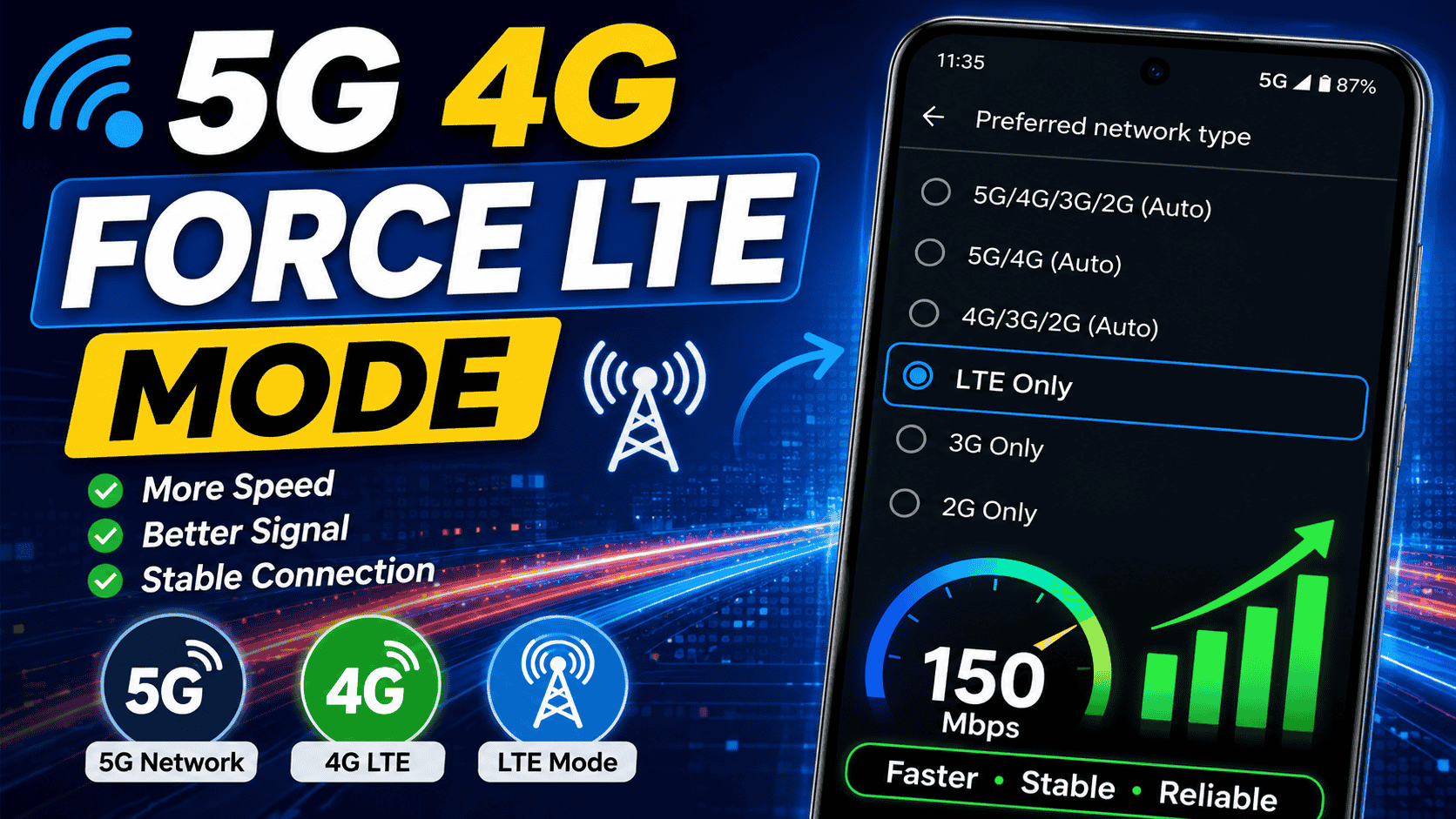
Depending on the phone model and Android version, users may see network options such as:
- 5G Preferred
- 5G/LTE/3G Automatic
- LTE Preferred
- LTE Only
- 3G Only
- Automatic Network Selection
The exact options available depend on the smartphone manufacturer, mobile carrier, Android version, and device chipset.
Why Do People Use Force LTE Mode?
One of the main reasons people search for 5G 4G FORCE LTE MODE is network stability. A phone located at the edge of a 5G coverage area may continuously switch between 5G and 4G. This process can sometimes interrupt downloads, online gaming, video streaming, or other internet activities.
Forcing a more stable LTE connection can sometimes provide a better experience than using a weak 5G signal.
Common Reasons for Using LTE Mode
- Weak or unstable 5G coverage
- Frequent switching between 4G and 5G
- Improving connection stability
- Reducing network interruptions
- Testing mobile internet performance
- Improving battery efficiency in some situations
- Using a stable connection for streaming or gaming
However, forcing a particular network type does not automatically guarantee faster internet. Network speed depends on many factors, including signal strength, network congestion, carrier infrastructure, location, and device compatibility.
5G vs 4G LTE: What Is the Difference?
Both 5G and 4G LTE provide high-speed mobile internet, but they are designed for different levels of performance.
5G Networks
5G is the newer generation of mobile network technology. In areas with strong coverage and modern network infrastructure, 5G can offer faster speeds and lower latency than traditional 4G networks.
Potential advantages of 5G include:
- Faster download speeds
- Lower latency
- Better performance for modern applications
- Improved network capacity
- Support for more connected devices
However, 5G coverage may not be equally strong everywhere. Some locations may have limited coverage or weaker signals indoors.
4G LTE Networks
4G LTE remains one of the most widely available mobile network technologies. In many areas, LTE provides excellent coverage and stable internet performance.
Advantages of LTE include:
- Wide network coverage
- Reliable connectivity
- Good internet speeds
- Strong compatibility with most Android devices
- Stable performance in many locations
For many users, a strong LTE connection can provide a better real-world experience than a weak or unstable 5G connection.
How Does 5G 4G FORCE LTE MODE Work?
Android devices contain modem and network settings that control how the smartphone connects to available mobile networks. Some phones provide these options directly inside the Settings application, while others may hide advanced options depending on the manufacturer or mobile carrier.
A 5G 4G Force LTE Mode tool may provide access to supported network preference settings. Users can then select an available network mode.
For example, a user may choose LTE Preferred when:
- 5G coverage is weak
- The phone repeatedly switches networks
- LTE provides a stronger signal
Another user may choose a 5G preferred setting when strong 5G coverage is available.
It is important to understand that applications cannot create 5G coverage or increase the physical signal strength of a mobile tower. They can only help users access supported network preference settings when the device and Android system allow it.
Benefits of Using 5G 4G FORCE LTE MODE
1. More Control Over Network Selection
The main benefit is greater control. Instead of allowing the smartphone to constantly decide which network to use, users may be able to prioritize a network type that works better in their location.
2. Better Network Stability
Network switching can sometimes cause temporary interruptions. If one network is significantly more stable than another, choosing that network may improve the consistency of the connection.
3. Useful for Internet Testing
Users can compare the performance of available network technologies. For example, they can test whether 5G or LTE provides better download speeds and lower latency at home or work.
4. Potential Battery Benefits
In some situations, constantly searching for a weak network signal may increase battery usage. Selecting a stable and reliable network may reduce unnecessary network switching. Battery results will vary depending on the phone and signal conditions.
5. Better Experience for Streaming
A stable connection is important for watching videos, joining video calls, or downloading large files. LTE may sometimes offer more consistent performance than a weak 5G connection.
Important Things to Know Before Changing Network Modes
Before using any Force LTE Mode setting, users should understand that network configuration can affect calls, messages, and mobile data.
Some important points include:
- Not every Android phone supports manual network mode selection.
- Available options depend on the device and carrier.
- Some network modes may affect voice calling.
- Emergency services should never be compromised by incorrect network settings.
- Some carriers restrict access to advanced network options.
- Changing unsupported settings may cause connection problems.
If you experience problems after changing a network preference, returning the device to automatic network selection is usually the safest option.
Does Force LTE Mode Increase Internet Speed?
This is one of the most common questions. The answer is that Force LTE Mode does not automatically increase internet speed.
Internet performance depends on several factors:
- Distance from the mobile tower
- Signal strength
- Network congestion
- Carrier bandwidth
- Phone hardware
- Weather and physical obstacles
- Indoor or outdoor location
However, forcing a stable network may improve the user experience. For example, if your phone keeps switching between a weak 5G signal and a strong LTE signal, staying connected to LTE may provide more consistent speeds.
How to Check Your Current Network Type
Most Android phones display the current network type in the status bar. You may see symbols such as:
- 5G
- 5G+
- 4G
- LTE
- 3G
You can also check the network settings section of your Android device. The exact location varies between manufacturers, but it is usually found under:
Settings > Mobile Network > Preferred Network Type
Some devices may use different names for these settings.
Can All Android Phones Use Force LTE Mode?
No. Support varies between devices. Android manufacturers customize the operating system and network settings differently.
Some smartphones provide advanced network options directly in the Settings application. Others restrict these options because of carrier requirements or device software limitations.
Compatibility can depend on:
- Android version
- Smartphone manufacturer
- Phone model
- Mobile carrier
- Chipset and modem
- Regional software configuration
Therefore, a network option available on one Android phone may not be available on another.
Common Problems with Forced Network Modes
Although selecting a specific network can sometimes improve stability, users may experience problems if the selected mode is not suitable for their area.
No Mobile Signal
If a user selects a network type that is unavailable in the area, the phone may lose connectivity.
Calling Problems
Some network configurations may affect voice services depending on the carrier and whether technologies such as VoLTE are properly supported.
Slow Internet
Forcing LTE will not help if the LTE network itself is congested or weak. In some locations, automatic selection may provide better results.
Network Settings Reset
Some phones may return to automatic network selection after restarting, updating the system, or changing SIM cards.
Best Network Mode for Gaming
There is no single best network mode for every gamer. Online gaming requires a stable connection and low latency.
If 5G coverage is strong and stable, it may provide excellent performance. However, a strong LTE connection may be better than unstable 5G.
For the best gaming experience, test both networks and compare:
- Ping
- Download speed
- Upload speed
- Connection stability
The most stable network is usually more important than the network label.
Best Network Mode for Video Streaming
For YouTube, social media, movies, and other streaming services, connection stability is essential.
Both 5G and LTE can provide excellent streaming performance. If videos frequently buffer while connected to weak 5G, switching to a stronger LTE network may improve playback.
Is 5G 4G FORCE LTE MODE Safe?
Using normal Android network preference settings is generally safe. However, users should avoid changing advanced technical settings that they do not understand.
A network mode application cannot physically improve the strength of your mobile network or bypass your carrier’s limitations. It only works within the capabilities provided by the device and operating system.
Always use trusted applications and review requested permissions before installing any Android app.
Frequently Asked Questions
What is 5G 4G FORCE LTE MODE?
It refers to network settings or tools that allow users to select or prioritize supported mobile network technologies such as 5G or 4G LTE.
Does Force LTE Mode make the internet faster?
Not automatically. It may improve stability if LTE has a stronger and more reliable signal than 5G in your location.
Can I force my phone to use 5G?
This depends on your phone, carrier, software configuration, and local 5G coverage.
Will LTE mode work on every Android phone?
No. Available network options depend on the device manufacturer, Android version, carrier, and hardware.
Can changing network mode affect phone calls?
Yes, in some cases. Voice services depend on carrier configuration and technologies such as VoLTE. If you experience problems, return to automatic network selection.
Conclusion
5G 4G FORCE LTE MODE can be useful for Android users who want greater control over their mobile network connection. A strong and stable LTE connection may sometimes provide better real-world performance than an unstable 5G signal.
The best option depends on your location, mobile carrier, phone model, and network coverage. Rather than assuming that 5G is always faster, test the available network options and choose the one that provides the best combination of speed, stability, and reliability.
Remember that forcing a network mode cannot create stronger coverage or bypass carrier limitations. The most important factor is finding a stable network connection that works well in your area. If you experience signal, calling, or mobile data problems after changing network settings, switching back to automatic network selection is usually the best solution.
Download Button 15 seconds timers